By Handy Finds Club · November 6, 2026
Research-based recommendations. Our approach.
A document beside the numbers
Read a document while updating a worksheet beside it. The 27-inch, 5K Studio Display (2022) is a premium option for that work on a compatible Apple silicon Mac you already own. Add the numeric keyboard only if repeated number entry is part of your day.
The display is not a computer. A Mac and a mouse or trackpad are separate; use the ones you already have. These two picks are not a complete computer bundle.
Check your Mac and your desk
Check your exact Mac against Apple's 2022 display compatibility list before ordering. The selected 2024 USB-C keyboard requires a Mac with Apple silicon running macOS 15.1 or later. A USB-C socket alone does not establish compatibility.
The selected display is 24.5 inches wide with a 6.6-inch-deep stand, and its stand adjusts for tilt, not height. The keyboard is 16.48 inches wide; leave room for your pointing device.
Keep the versions clear
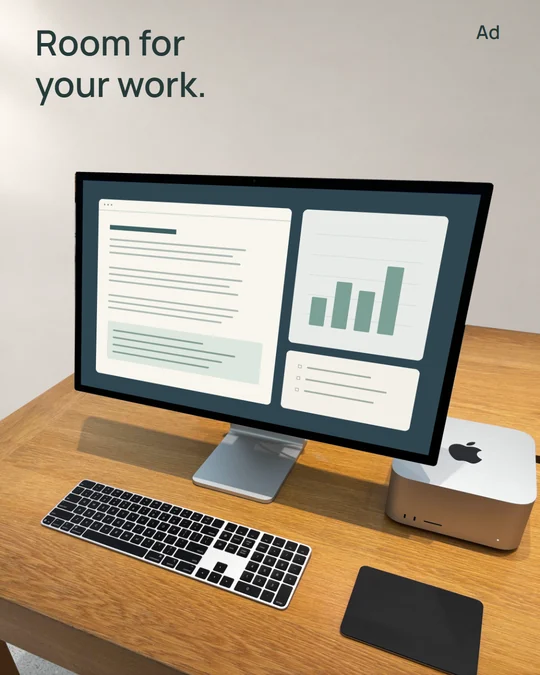
The photo shows a 2022 Studio Display and a black, US-layout Touch ID keyboard with a numeric keypad. Its glass finish and the keyboard's charging connector are unverified. The linked options specify standard glass and a tilt-adjustable stand, plus the separate 2024 USB-C keyboard, MXK83LL/A.
The display shopping link is Amazon Renewed, MK0U3LL/A: a pre-owned option, not Apple's Certified Refurbished program. Check the seller, accessories and return terms. The 2022 display uses Thunderbolt 3; the 2026 Studio Display has Thunderbolt 5 and a camera with Desk View. The newer specifications do not describe the pictured display.
Keep what already works
Skip the display if your current screen is enough, your priority is a lower-cost setup, you mainly use Windows, or you only want a new unit. Keep your keyboard if it already suits you; occasional number entry is little reason to replace it.
Amazon links are paid links; Apple detail links are ordinary links. Check Renewed condition, stock, seller, shipping charges and delivery to your US address before ordering. These are research-based suggestions; we have not tested these products or this setup. Sources checked November 6, 2026.
Sources & further details
Manufacturer links show current specifications, variants, and availability. Check those details before ordering.
Photo source and image provenance
Source photo: Apple Studio Display and Mac Studio with Peripherals by AzureSaturn, photographed December 23, 2025, via Wikimedia Commons. CC0 1.0 Universal. Edited for Handy Finds Club.
The shop background was replaced with an AI-generated neutral setting and the screen artwork with an original illustrative document and chart. The photographed equipment and wooden desk retain their proportions and relative positions. The screen is not a real app or a performance demonstration. Mac Studio and Magic Trackpad are separate scene objects, not included or additional recommended products. This is an illustrative composition, not a hands-on test. No Apple or photographer endorsement is implied.
View the full-resolution scene.
Back to the picks ↑